
10 ways to use AI with your databases

Catch the webinar recording from Aug 4th on YouTube

DBeaver Community

Open-source version
  • Basic support for relational databases:
    MySQL, SQL Server, Postgres and others
  • Data Editor
  • SQL Editor
  • Task management
  • Database maintenance tools
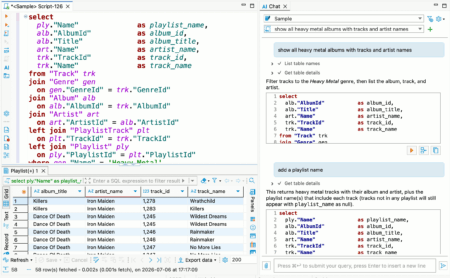
  • AI Chat & @ai command

DBeaver PRO

Commercial version
  • All DBeaver Community features
  • Advanced security
  • AI Chat & advanced AI features
  • Advanced support for relational databases
  • Connection through ODBC drivers
  • NoSQL databases support:
    MongoDB, Cassandra, Redis, CouchDB and others
  • Cloud databases support:
    Redshift, Google BigQuery, Oracle Cloud and others
  • Native support for AWS, Google Cloud, and Azure
  • Cloud storage support
  • Database development tools
  • Database performance visual tools
  • Multi-component task management
  • Task Scheduler
  • Visual Query Builder
  • Ongoing technical support

dbvr Community

Open-source version
  • Basic support for relational databases:
    MySQL, SQL Server, Postgres and others
  • Username + password auth support
  • SSH tunnels support
  • Query result export to the local disk
  • Metadata management

dbvr

Commercial version
  • Advanced security:
    master password and strong credentials encryption
  • Enterprise-level authentication methods:
    SSO, SSL, and Kerberos. SSO authentication cloud services such as GCP, AWS, and Azure
  • Secret management: AWS, Vault, CyberArk
  • Advanced SQL databases support:
    MySQL, PostgreSQL, SQL Server, Oracle and others
  • NoSQL databases support:
    MongoDB, Cassandra, Redis, CouchDB and others others
  • Cloud databases support:
    Redshift, Google BigQuery, Oracle Cloud and others
  • Amazon S3, Azure Blob Storage and GCP cloud storages support
  • Query result export to the cloud storages
  • MCP configuration to expose a database connection as an MCP server
  • Ongoing technical support

DBeaver 26.2.3

  • AI Assistant:
    • Added drag-and-drop support for Navigator objects and files in AI Chat
    • Added support for attaching images to AI Chat from files, drag-and-drop, and the clipboard
    • Fixed an issue where closing multiple SQL Editor tabs cleared the selected AI Chat connection and conversation
    • Fixed SQL block Execute, Copy, and Open in editor actions on Linux (thanks to @Josephur)
    • Fixed small font sizes and unnecessary truncation for profile and model names in AI Chat
    • ChatGPT subscription errors are now displayed as readable messages instead of raw JSON
  • SQL Editor:
    • Added the ability to execute SQL script files without opening them in the SQL Editor
    • Added a notification for refreshing affected metadata after successful DDL execution
    • Fixed an issue where new SQL templates used Vertica instead of abstract SQL as the default context
    • Fixed SQL Editor corruption when deleting an auto-inserted closing bracket in Eclipse installations with TM4E (thanks to @RoiSoleil)
  • Metadata Editor:
    • Fixed checkbox backgrounds in the table column dialog on macOS in dark mode
  • Data Editor:
    • Fixed Adaptive Ordering for large numeric values
    • Fixed row order when dragging multiple selected result-set rows into the SQL Editor (thanks to @Abdulrahman295)
  • Data transfer:
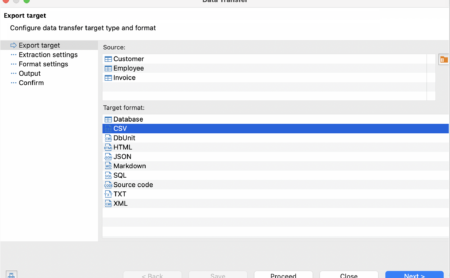
    • Redesigned the extraction settings page
    • Redesigned the export target page with in-wizard source management
  • Connectivity:
    • Improved error messages for invalid SSH known-hosts files with the affected file path and corrective guidance
    • Fixed empty credential dialogs for integrated authentication methods
    • Fixed an issue where connection settings could be cut off and could not be scrolled after changing authentication options
  • Security:
    • Fixed a command execution vulnerability by requiring confirmation before running shell commands used to retrieve connection passwords (CWE-78, CWE-306)
    • Fixed high, medium, and low vulnerabilities in the lz4-java library used by the ClickHouse and Databricks drivers (CVE-2026-106451, CVE-2026-106450, and CVE-2026-106449). The library was updated to version 1.11.4.
  • Product configuration:
    • Git integration is now enabled by default when existing Git projects are detected
    • The SQLite sample database is now enabled by default
  • New drivers:
    • Added support for YashanDB (thanks to @YoungQinger9)
  • Databases:
    • Clickhouse: Added the ability to rename tables from the Navigator tree.
    • CUBRID: Fixed extra quoting around hexadecimal default values in generated DDL (thanks to @longhaseng52)
    • MySQL: Restored bold highlighting for catalogs and tables with granted privileges
    • Oracle: User profiles now show their assigned users
    • PostgreSQL:
      • Fixed bulk imports that mishandled literal backslashes or custom CSV escape characters
      • Fixed SQL formatting for the @? operator (thanks to @SemTiOne)
    • SQL Server:
      • Fixed missing quotes around datetimeoffset values when copying multiple cells or rows as SQL
      • Non-online databases are now marked in Navigator, and their status is shown in the Databases tab (thanks to @michalpsyk)
    • Localization:
      • Added Traditional Chinese (Taiwan) localization

DBeaver 26.2.2

  • AI Assistant:
    • Redesigned the AI engine selector with a native drop-down, engine icons, and improved keyboard accessibility
    • Fixed model discovery for self-hosted OpenAI-compatible endpoints with non-OpenAI model names
    • Improved error messages for HTTP redirects from custom OpenAI-compatible endpoints by showing the redirect target and configuration guidance
    • Fixed model listing and chat requests for self-hosted OpenAI-compatible endpoints when the base URL has no trailing slash (thanks to @Ashfaqbs)
    • Improved guidance and validation when the custom AI scope contains no database object
    • Fixed an issue on macOS where opening the AI profile or model picker could immediately select an item
  •  SQL Editor:
    • Added a setting to choose whether Enter, Tab, both, or neither accepts autocomplete suggestions
    • Added a preference to disable the large-script result-fetch warning (thanks to @akmalsyrf)
    • Fixed SQL Editor toolbar background colors for color-coded connections in the dark theme
      -=
  • Metadata Editor:
    • Fixed invalid table DDL generation when column comments contain double hyphens (thanks to @MicBun)
    • Data Editor:
    • Made the issue-reporting link clickable when the calendar editor encounters an unsupported date/time value
    • Fixed spacing and background inconsistencies in the virtual structure editor
  • Connectivity:
    • The connection wizard now prompts users to choose a connector when the selected database has multiple options
    • Improved navigation between project and global network profile settings
    • Improved the confirmation dialog for removing a network handler
  • Navigator:
    • Restored context menus for breadcrumbs in object editors and the status bar
    • Fixed a startup freeze when Database Navigator was in a detached window
  • Miscellaneous:
    • Fixed a Linux startup crash when the Product Configuration wizard opened
    • Redesigned and reorganized the General preferences page
    • Improved Preferences search by adding keywords to preference pages
    • Fixed inaccurate progress reporting during native tool file transformations (thanks to @cuishuang)
    • Fixed overly bright hover highlighting for view minimize and maximize buttons on Windows in the dark theme
    • Improved editor tab visibility by adding separators between unselected tabs
    • Fixed excessive accumulation of temporary files and improved cleanup of abandoned files
    • Fixed diagnostic archive collection to include all rotated log files
    • Fixed version-update controls to prevent duplicate downloads and keep the update button correctly positioned
    • Improved drop-down list sizing, scrolling, and theme colors
    • Improved UI color updates after changing the application theme without restarting DBeaver
    • Improved the contrast of inactive editor tabs for color-coded connections in the dark theme
    • Added theme selection with live preview to the User Interface preferences
  • Databases:
    • Apache Doris: Fixed CSV import into schemas and post-import table refresh
    • GBase 8s:
    • Fixed JSON value handling in the “Copy As SQL” command (thanks to @Downstream1998)
    • Fixed the Columns tab failing to load when the read_defaultstr routine is unavailable (thanks to @sakshichitnis27)
    • PostgreSQL: Added support for viewing and managing the PUBLIC pseudo-role in Permissions tabs (thanks to @NikRom5531)
    • TiDB Cloud Lake: Added the TiDB logo to the connection page (thanks to @akshar27)
    • Timeplus: Fixed incorrect numeric values and intermittent hangs during CSV import (thanks to @EastLord)

Recent News

Keep up with DBeaver

Subscribe to our news and get the list of the most useful shortcuts in DBeaver.


Explore the DBeaver blog for practical tips and product news.

License

DBeaver Community Edition is free and open source (ASL) product.
Just download and start using it.